

Introduction: Why Budgeting for Shopify Web Design Matters in Canada
Canadian businesses increasingly rely on e-commerce to reach customers at home and abroad, and Shopify has become one of the most popular platforms for building online stores. Yet a successful Shopify project depends on more than choosing the right platform. It depends on planning a realistic web design budget. Whether you run a small retail shop in Halifax or a growing brand in Toronto, understanding what Shopify web design costs in Canada helps you avoid surprises, compare quotes fairly, and invest in a store that supports long-term growth.
The Rise of Shopify in the Canadian E-commerce Landscape
Shopify is a Canadian-founded platform, and its local roots have helped it gain strong adoption among businesses across the country. From independent makers to established retailers, many Canadian companies choose Shopify because it offers a manageable way to launch and scale an online store. The platform handles hosting, security, payment processing, and many technical details, which allows business owners to focus on products, marketing, and customer service.
At the same time, the platform’s flexibility means design and development work can vary widely. A basic theme setup with minor customizations is very different from a fully custom storefront with unique features, integrations, and multilingual support. That range is precisely why budgeting matters. The cost of Shopify web design in Canada is not a single number; it reflects the scope, complexity, and level of expertise your project requires.
Several factors are driving continued demand for well-designed Shopify stores in Canada:
- More Canadian consumers are comfortable buying online across categories.
- Small and mid-sized businesses want professional storefronts that compete with larger brands.
- Social commerce and mobile shopping require responsive, fast-loading designs.
- Cross-border selling encourages features like multi-currency and localized content.
Common Pitfalls of Underbudgeting for Web Design
Underbudgeting for Shopify web design often creates problems that cost more to fix later. A store built on a tight budget may launch quickly, but it can struggle to convert visitors, rank in search results, or handle growth. Common issues include:
- Poor user experience: Cluttered layouts, confusing navigation, and slow pages drive customers away.
- Weak mobile performance: Many Canadian shoppers browse on phones, so a design that is not mobile-first loses sales.
- Limited customization: Cheap theme edits can look generic and fail to reflect your brand.
- Missed integrations: Payment gateways, shipping tools, inventory systems, and email platforms may not work smoothly.
- Ongoing maintenance costs: Rushed builds often need frequent fixes, which adds up over time.
These pitfalls do not mean every business needs the most expensive option. They mean the budget should match the goals. A store expected to generate significant revenue needs a design investment that supports reliability, usability, and future updates.
How This Guide Helps You Plan Your Investment
This guide breaks down the factors that shape Shopify web design pricing in Canada so you can plan with confidence. It covers typical cost ranges, what influences those ranges, and how to decide where to spend and where to save. You will also find practical questions to ask agencies and freelancers, plus a simple framework for comparing quotes.
By the end, you should be able to:
- Estimate a realistic budget for your Shopify project.
- Understand the difference between template-based and custom design.
- Identify hidden costs such as apps, content, and ongoing support.
- Choose a design partner whose quote aligns with your business goals.
Budgeting is not about limiting ambition. It is about making informed choices that protect your investment and set your Canadian Shopify store up for sustainable growth.
Key Factors That Influence Shopify Web Design Costs in Canada
Shopify web design pricing in Canada rarely follows a single flat rate. Two stores with similar product counts can receive quotes that differ by thousands of dollars, because the total reflects how much strategy, design, development, and ongoing support each project requires. Before comparing proposals, Canadian business owners should understand the three variables that move the needle most: what the store must do, who builds it, and how much of the design is custom.
Project Scope and Complexity: From Simple Stores to Advanced Customizations
Scope is the strongest cost driver. A small catalog using a premium theme, standard checkout, and a handful of apps may take a freelancer one to two weeks. A store with thousands of SKUs, custom product configurators, subscription logic, wholesale pricing, multi-currency support, or integrations with Canadian ERP and accounting tools can take several months.
Complexity also includes content and data work that is easy to underestimate:
- Product migration and cleanup from another platform
- Custom collection filtering, search, and merchandising rules
- Bilingual or multilingual storefronts for English and French markets
- Third-party integrations such as ERP, CRM, POS, or fulfillment systems
- Custom checkout, cart, or account experiences
- Accessibility and performance optimization
Each item adds design, development, testing, and quality assurance time. A useful rule of thumb: the more the store deviates from Shopify’s default behaviour, the more the budget climbs.
Designer or Agency Expertise: Freelancers vs. Agencies vs. DIY
Who builds the store affects both hourly rates and project management overhead. In Canada, rates vary widely by region, specialization, and experience, so treat the table below as a general comparison rather than a quote.
| Provider | Typical Strength | Cost Tendency | Best For |
|---|---|---|---|
| DIY with a theme | Lowest upfront cost, full control | Theme and app fees only | Simple stores, tight budgets, hands-on owners |
| Freelancer | Direct communication, flexible scope | Moderate | Small to mid-sized stores with clear requirements |
| Agency or studio | Strategy, design, development, QA, support | Highest | Complex stores, rebrands, high-growth brands |
Agencies carry project managers, designers, developers, and testers, which raises cost but reduces risk on complicated builds. Freelancers can be excellent value when the scope is well defined. DIY saves money but consumes owner time and often produces weaker conversion results.
Custom Design vs. Template Customization: Cost Implications
Template customization is the budget-friendly path. A developer adjusts colours, typography, sections, and layouts within an existing theme. The structure is proven, so work is faster and less risky. Costs stay lower because you are configuring rather than inventing.
Custom design starts from a blank canvas: wireframes, unique page templates, bespoke components, and often custom Liquid development. This approach supports distinctive branding and unusual functionality, but it requires more discovery, revision rounds, and testing. Expect the highest design fees here, plus ongoing maintenance when Shopify or apps update.
A practical middle ground is a premium theme with targeted custom sections for key pages such as the homepage, product template, and landing pages. This keeps most of the store on a stable foundation while investing custom budget where it affects conversion most.
For a concrete example of how customization level appears in theme code, a custom section is defined in a Liquid file using a schema block:
{% schema %}
{
  "name": "Featured Collection",
  "settings": [
    { "type": "text", "id": "heading", "label": "Heading" },
    { "type": "collection", "id": "collection", "label": "Collection" }
  ],
  "presets": [{ "name": "Featured Collection" }]
}
{% endschema %}
Every custom section like this adds development and testing time, which is why scope, expertise, and customization level should always be evaluated together when budgeting for Shopify web design in Canada.
Typical Shopify Web Design Pricing Tiers in Canada
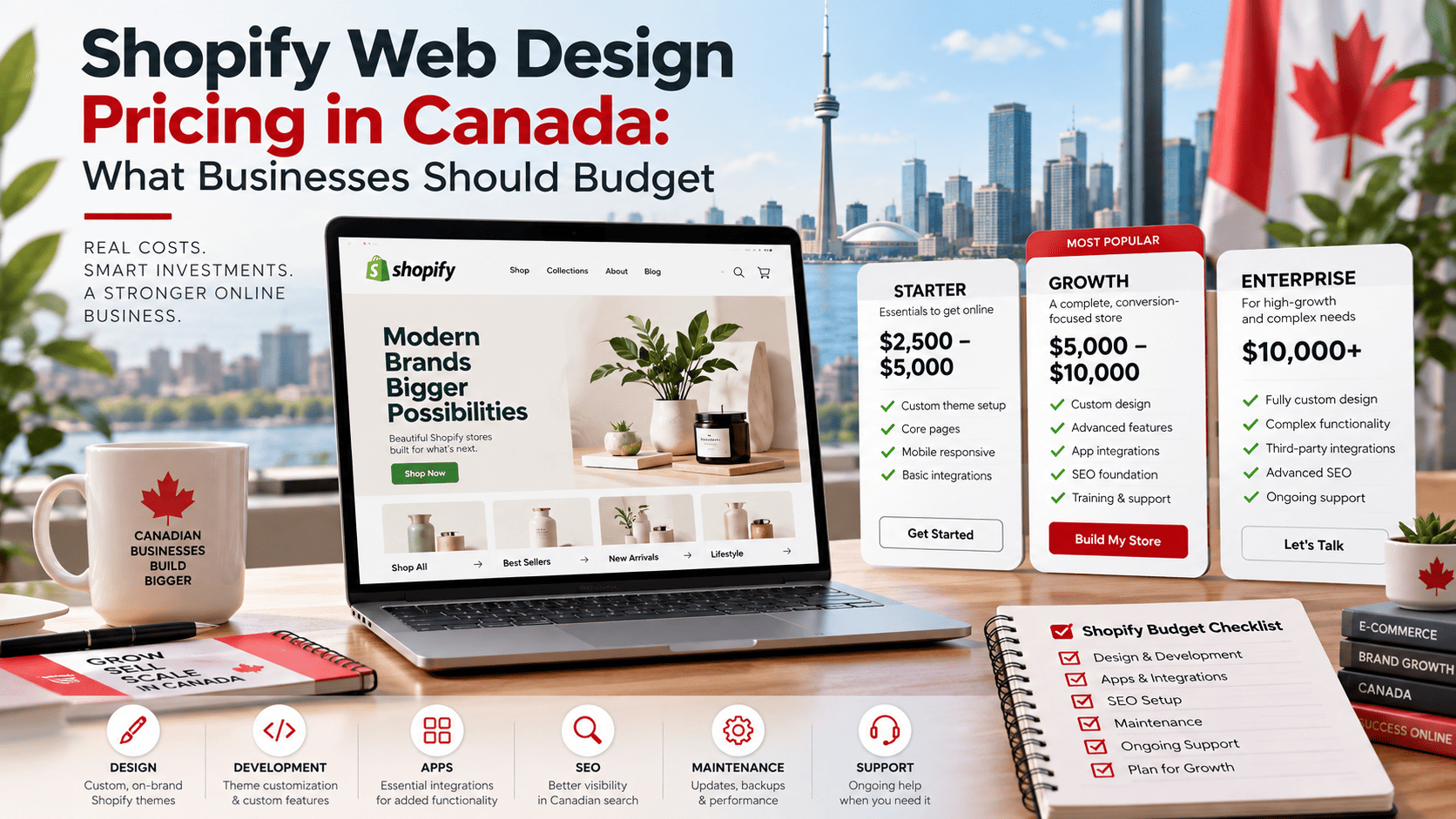
Shopify web design pricing in Canada generally falls into three broad tiers. The right tier depends on how much customization your store needs, how many products you sell, and whether your team can handle setup tasks internally. Most Canadian agencies and freelancers quote in Canadian dollars, and prices can vary by province, team size, and project complexity.
Before choosing a tier, it helps to understand what each range typically includes. The following breakdown covers the most common pricing bands for Shopify design and development work in Canada.
Basic Setup and Template Customization: $2,000 – $5,000
This tier suits small businesses, new ecommerce brands, and stores with a limited product catalog. The work usually starts with a premium Shopify theme, such as Dawn, Impulse, or a similar paid template. A designer then adjusts colors, fonts, homepage sections, product pages, and navigation to match your brand.
Typical deliverables at this level include:
- Installation and configuration of a premium or free Shopify theme
- Basic brand styling, including logo placement and color palette
- Setup of core pages such as Home, Shop, Product, About, and Contact
- Configuration of payments, shipping zones, and taxes for Canadian sales
- Basic app integrations for reviews, email, or analytics
- Limited mobile responsiveness checks and a short handover session
Custom coding is usually minimal. Most of the work involves theme settings, drag-and-drop sections, and content entry. A Canadian freelancer may charge less, while a small agency may sit at the higher end. If you need copywriting, product photography, or advanced app setup, expect the final invoice to move toward $5,000.
Mid-Range Custom Design: $5,000 – $15,000
This is the most common range for established Canadian businesses that want a distinct storefront rather than a lightly edited template. Designers typically create custom page layouts, build reusable sections, and tailor the buying experience to your products and audience.
Projects in this tier often include:
- Custom homepage, collection, and product page design
- Development of custom Shopify sections and blocks
- Conversion-focused features such as upsells, bundles, or quick-view options
- Integration with Canadian payment gateways, shipping carriers, and tax tools
- Multilingual or multi-currency setup for cross-border sales
- Speed optimization, SEO basics, and analytics configuration
- Testing across devices and browsers before launch
At this level, you are paying for strategy as well as execution. The agency or freelancer should ask about your margins, average order value, and fulfillment process. That discovery work shapes the design and prevents expensive rework later. Timelines usually run from four to ten weeks, depending on the number of templates and integrations.
High-End Custom Development: $15,000 – $50,000+
High-end Shopify projects are built for larger catalogs, complex operations, or brands that treat ecommerce as a primary revenue channel. This tier often involves a dedicated team, including a strategist, designer, developer, and project manager.
Common features at this level include:
- Fully custom theme development or a headless Shopify build
- Advanced product configurators, subscriptions, or B2B wholesale portals
- ERP, CRM, inventory, and warehouse integrations
- Custom checkout extensions and loyalty or referral systems
- Performance engineering for large catalogs and high traffic
- Ongoing optimization, A/B testing, and conversion rate analysis
Prices above $50,000 are common for enterprise-level builds, especially when custom apps or headless architecture are involved. Canadian agencies in major cities such as Toronto and Vancouver tend to charge more than solo developers in smaller markets, but scope and experience matter more than location.
| Pricing Tier | Typical Canadian Price Range | Best For | Custom Development Level |
|---|---|---|---|
| Basic Setup and Template Customization | $2,000 – $5,000 | New stores and small catalogs | Low: theme settings and light edits |
| Mid-Range Custom Design | $5,000 – $15,000 | Growing brands needing a distinct storefront | Moderate: custom sections and integrations |
| High-End Custom Development | $15,000 – $50,000+ | Large catalogs, B2B, and enterprise operations | High: custom theme or headless build |
When comparing quotes, ask what is included beyond design: training, documentation, post-launch support, and app subscriptions can change the true cost. A lower quote may exclude content migration or testing, while a higher quote may include conversion strategy and ongoing maintenance. Budget for both the initial build and the first year of apps, hosting, and support.
The Cost of Shopify Themes and Apps: What to Expect
When Canadian businesses budget for Shopify web design, the platform subscription is only the starting point. Themes and apps often account for a significant share of the total cost, and understanding how these expenses behave over time helps you avoid surprises. Some are one-time purchases, others are recurring subscriptions, and a few can quietly grow into custom development projects.
Premium Theme Costs: One-Time Fees vs. Subscription Models
Shopify’s free themes are functional, but many Canadian retailers choose a premium theme for better design flexibility, conversion-focused layouts, and built-in features. Premium themes typically fall into two pricing models:
- One-time purchase: Most premium themes sold through the Shopify Theme Store cost a single fee, commonly in the range of CAD $250 to $500. You pay once and keep the theme, though major version upgrades may carry an additional charge.
- Subscription themes: Some theme developers now offer monthly licensing, often CAD $20 to $50 per month. This lowers the upfront cost but increases the total spend over a multi-year horizon.
For a store expected to operate for several years, a one-time theme fee is usually the more economical choice. Subscription themes can make sense for short-term campaigns or businesses that want ongoing updates and support bundled into the price.
Must-Have Apps for Canadian Stores: Monthly and Annual Costs
Apps extend Shopify’s core functionality, and most charge recurring fees. A typical Canadian store budget should account for the following categories:
| App Category | Typical Monthly Cost (CAD) |
|---|---|
| Email and SMS marketing | $15 – $100+ |
| Reviews and social proof | $10 – $50 |
| Shipping and tax automation | $10 – $40 |
| Upsells and bundles | $10 – $40 |
| Analytics and reporting | $10 – $60 |
Many apps offer annual billing at a discount, often equivalent to one or two free months. Canadian merchants should also watch for apps priced in USD, since exchange rates affect the real cost. A store running eight to ten apps can easily spend CAD $150 to $400 per month on software alone.
Hidden Costs: App Integrations and Custom Development
Apps rarely work in perfect isolation. Connecting them to your theme, your checkout flow, or each other sometimes requires developer time. Common hidden costs include:
- Theme customization so app widgets match your brand and layout
- Custom scripts or Shopify Functions for advanced shipping, tax, or discount logic
- Data migration or API integrations with accounting and inventory systems
- Ongoing maintenance when apps update and break existing customizations
For example, a developer might add a custom Shopify Function to validate checkout rules for a Canadian province:
// shopify.extension.toml
[[extensions]]
type = "function"
name = "province-validation"
handle = "province-validation"
Even small custom jobs like this often start around CAD $500 and rise quickly with complexity. Budgeting a contingency of 10 to 20 percent of your app and theme spend is a practical way to absorb these integration costs without derailing your overall Shopify web design budget.
DIY vs. Hiring a Professional: Cost-Benefit Analysis for Canadian Businesses
When planning a Shopify store, the design decision often comes down to budget versus time. A Canadian business owner can build a storefront alone using low-cost tools, hire a freelancer for targeted help, or retain an agency for end-to-end delivery. Each route carries different upfront costs, timelines, and long-term value. The right choice depends less on the cheapest option and more on what the business needs the store to achieve in its first year.
The table below summarizes the typical trade-offs Canadian businesses weigh when comparing these three approaches.
| Approach | Upfront Cost | Time Investment | Quality and Support |
|---|---|---|---|
| DIY platforms and tools | Low | High | Variable, owner-dependent |
| Freelance designers | Moderate | Medium | Skilled but inconsistent |
| Agencies and studios | High | Low for the owner | Comprehensive and structured |
DIY Platforms and Tools: Lower Upfront Costs but Higher Time Investment
DIY Shopify design relies on free or low-cost themes, drag-and-drop editors, and app-based customizations. The direct spend is minimal, which appeals to startups and side businesses testing an idea. However, the real cost is time. Learning theme settings, troubleshooting layout issues, and writing product copy can consume dozens of hours that could otherwise go toward sales, sourcing, or customer service.
DIY also tends to produce a functional but generic store. Conversion-focused details such as mobile speed, checkout flow, and trust signals are easy to overlook without design experience. For a business with more time than money, DIY can be a reasonable starting point, but it often leads to a redesign once revenue grows.
Freelance Designers: Affordable Expertise with Variable Quality
Freelance Shopify designers sit between DIY and agency work. They typically charge less than studios and can deliver a custom theme, branding adjustments, and app setup faster than an owner working alone. For Canadian businesses, hiring a freelancer can be a cost-effective way to get professional polish without a large retainer.
The main risk is variability. Freelancers range from highly experienced specialists to generalists learning Shopify on the job. Before hiring, businesses should review:
- Live Shopify stores the freelancer has designed
- Client references or testimonials
- Clarity on scope, revisions, and handover files
- Whether ongoing maintenance is available after launch
A strong freelancer offers excellent value, but the owner must manage timelines and quality checks.
Agencies and Studios: Higher Cost but Comprehensive Support
Agencies and design studios charge the most, but they bundle strategy, UX design, development, copy support, and post-launch optimization. For established Canadian retailers or brands with complex catalogs, this approach reduces risk and shortens time to launch. The owner spends less time coordinating tasks and more time on marketing and operations.
The higher fee is best justified when the store is a primary revenue channel. Agencies can also handle integrations, multilingual needs, and accessibility requirements that DIY and some freelancers may miss. The trade-off is cost and less direct control over day-to-day decisions.
Ultimately, the best value comes from matching the approach to the store’s revenue goals, internal skills, and launch timeline rather than choosing the lowest price alone.
Ongoing Costs: Maintenance, Hosting, and Marketing After Launch
The design and build phase of a Shopify store is only part of the investment. Once the site goes live, recurring costs begin immediately and continue for as long as the store operates. Businesses in Canada should treat these as fixed operating expenses rather than one-time project fees. The three largest categories are platform subscription and transaction costs, ongoing maintenance, and marketing.
Shopify Subscription Plans and Transaction Fees
Shopify charges a monthly subscription in the merchant’s local currency, so Canadian businesses pay in CAD. Plan tiers generally scale with features such as staff accounts, reporting depth, and checkout customization. A simplified comparison of typical monthly ranges is shown below.
| Plan | Typical Monthly Cost (CAD) | Best For |
|---|---|---|
| Basic | ~$39 | New and small stores |
| Grow | ~$105 | Scaling stores needing more staff and reports |
| Advanced | ~$399 | High-volume stores with advanced reporting needs |
Transaction fees also apply. When a customer pays through Shopify Payments, the store pays standard credit card processing rates. If a merchant uses a third-party payment gateway instead, Shopify adds an additional transaction fee on each sale, which varies by plan. Apps add further recurring charges; many useful apps bill monthly, and a store with ten apps can easily spend $100 to $300 per month. Domain registration, typically $15 to $25 per year, is another small but unavoidable cost.
Website Maintenance and Updates: Retainers and Hourly Rates
A Shopify store is not a static asset. Theme updates, app conflicts, product uploads, seasonal banners, and performance fixes all require attention. Canadian agencies and freelancers usually price this in one of two ways:
- Monthly retainer: commonly $200 to $1,500 per month depending on scope, covering a set number of hours and priority support.
- Hourly rate: typically $75 to $150 per hour for Shopify specialists in Canada.
Stores with frequent promotions, large catalogs, or custom Liquid code should budget toward the higher end. A simple store with minimal changes may only need a few hours per quarter. Either way, ignoring maintenance tends to produce larger repair bills later.
Digital Marketing and SEO: Essential Ongoing Investments
A finished website does not generate traffic on its own. Ongoing marketing is the largest variable cost after launch and often exceeds the original build budget over a full year. Common line items include:
- Paid social and search ads, which scale with revenue targets
- Email marketing platform fees and campaign management
- SEO content, technical audits, and link building
- Conversion rate optimization and analytics tracking
For Canadian businesses, a realistic starting point is $500 to $2,000 per month for a focused marketing effort, with higher budgets for competitive categories. Marketing should be planned alongside the design budget, because a well-built store still needs consistent traffic and optimization to produce returns. A practical way to track whether marketing spend is working is to review store analytics regularly. For example, a merchant can run a simple Shopify CLI command to pull theme and app context while auditing performance:
shopify theme list --store your-store.myshopify.comThis command lists installed themes, helping confirm which theme is live before making updates or running performance tests. Budgeting for subscription fees, maintenance, and marketing together gives Canadian businesses a clearer picture of the true annual cost of running a Shopify store.
Regional Pricing Variations Across Canada
Shopify web design pricing in Canada is not a single national rate. What a business pays often depends heavily on where the designer or agency is based, and on whether the client is willing to work with a remote team. Geography affects overhead, competition, talent supply, and client expectations, all of which feed into the final quote.
Major Hubs: Toronto, Vancouver, and Montreal Pricing Trends
Canada’s largest cities tend to carry the highest Shopify design rates. Agencies in Toronto and Vancouver face expensive office space, higher salaries, and a dense concentration of well-funded brands, which pushes project pricing upward. Montreal often sits slightly below Toronto and Vancouver, but it remains a premium market because of its strong creative and technology talent pool.
In these hubs, a custom Shopify storefront with theme customization, app configuration, and conversion-focused design can easily move into five-figure territory. Freelancers in the same cities also charge more than their counterparts elsewhere, though they may offer more flexible packages. Businesses here are often paying not just for design labour, but for proximity to established agencies, faster communication, and a portfolio of recognizable clients.
| Market | Typical Pricing Pressure | Common Driver |
|---|---|---|
| Toronto | High | Large agency ecosystem and corporate clients |
| Vancouver | High | Expensive overhead and premium brand expectations |
| Montreal | Medium to high | Strong talent pool with slightly lower overhead |
Smaller Cities and Rural Areas: Lower Rates but Limited Options
Outside the major hubs, Shopify web design pricing usually drops. A freelancer in a smaller city or rural area may have lower living costs and less competition, allowing them to quote less for comparable work. For budget-conscious businesses, this can be an advantage.
The trade-off is limited choice. A smaller market may have only a handful of designers who know Shopify well, and fewer still who specialize in ecommerce strategy, conversion optimization, or complex app integrations. Businesses may also find that local designers are generalists rather than Shopify specialists. In that case, the lower headline rate can be offset by longer timelines, extra revision cycles, or the need to hire additional support later.
- Lower rates: Often 20% to 40% below major-city pricing, though this varies by project.
- Limited talent pool: Fewer Shopify-specific designers and agencies to choose from.
- Broader scope gaps: Less access to advanced CRO, migration, and app development expertise.
- Local advantage: Easier in-person meetings and a stronger understanding of regional customers.
The Impact of Remote Work on Regional Pricing Disparities
Remote work has blurred the old geographic pricing lines. A business in Halifax can hire a Shopify designer in Toronto, and a designer in Winnipeg can serve clients in Vancouver. This increases competition and gives clients more leverage, but it does not erase regional differences entirely.
Many agencies still price according to their local market, so a Toronto agency may quote Toronto rates even for a remote client in a smaller province. Freelancers, by contrast, often adjust their rates based on the client’s budget and the perceived value of the project rather than location alone. As a result, businesses should compare quotes from multiple regions, verify Shopify-specific experience, and weigh communication and time-zone fit alongside price. The lowest quote is not always the best value, especially when a store’s revenue depends on a well-built Shopify experience.
How to Create a Realistic Shopify Web Design Budget
A realistic Shopify budget starts with your business plan, not a designer’s rate card. In Canada, Shopify web design costs vary widely based on scope, customization, and the team you hire. By assessing your needs first, comparing quotes carefully, and reserving a buffer for surprises, you can set a budget that keeps your project on track.
Assessing Your Business Needs and Goals
Before contacting any agency or freelancer, define what your store must accomplish. A single-product launch store needs far less than a multi-vendor marketplace with custom checkout logic. Write down your must-haves and nice-to-haves, then rank them by revenue impact.
Ask yourself:
- How many products, variants, and collections will you launch with?
- Do you need a custom theme, or can a premium Shopify theme be adapted?
- Will you require third-party integrations (ERP, CRM, subscription apps, POS)?
- Do you need copywriting, photography, or product data migration?
- What is your timeline, and does it allow for phased work?
A clear scope document reduces ambiguity and prevents scope creep, which is one of the most common reasons Canadian Shopify projects exceed their initial estimates.
Requesting and Comparing Quotes from Canadian Providers
Get at least three quotes from providers with verifiable Shopify experience. Compare them on deliverables, not just totals. A low quote that excludes theme customization, app configuration, or QA testing is not comparable to a comprehensive one.
Use a comparison table like this to normalize quotes:
| Quote Element | Freelancer | Small Agency | Established Agency |
|---|---|---|---|
| Typical scope | Theme setup, basic customization | Custom theme, app setup, migration | Custom build, integrations, CRO |
| Discovery and strategy | Limited or none | Basic workshop | Structured discovery phase |
| Post-launch support | Hourly, ad hoc | 30–90 day window | Retainer or support plan |
| Best for | Simple stores, tight budgets | Growing brands | Complex, high-volume stores |
Confirm what is included in writing: number of revision rounds, training, analytics setup, and who owns the final files. Also ask whether taxes, app subscriptions, and Shopify plan fees are separate from the design quote.
Setting Aside a Contingency Fund: Why 10-20% Buffer is Wise
Even well-planned Shopify projects encounter changes: a new integration, additional product data cleanup, or design revisions beyond the agreed rounds. A contingency fund of 10–20% of your project cost absorbs these without derailing your launch.
For example, if your quoted design work is $8,000, reserve an additional $800–$1,600. Treat this as untouchable unless a genuine need arises. If you finish under budget, apply the remainder to post-launch marketing or app subscriptions.
Finally, separate one-time design costs from recurring expenses such as your Shopify subscription, premium apps, domain, and ongoing maintenance. Budgeting for both categories gives you a complete, realistic picture of what your Shopify store will cost in Canada.
Maximizing ROI: Aligning Design Costs with Business Objectives
Spending on Shopify web design in Canada is only worthwhile if the finished store earns more than it cost. The smartest businesses treat design as an investment tied to specific outcomes rather than a one-time expense. Aligning your budget with clear business objectives—more sales, easier growth, and measurable performance—helps ensure every dollar works harder. The following strategies can guide that alignment.
Prioritizing Features That Drive Sales and Conversions
Not every design feature deserves equal funding. Before approving a quote, rank requested features by their expected impact on revenue. A fast, mobile-first product page and a frictionless checkout usually outperform decorative animations or complex custom illustrations. Ask your designer which elements directly support adding to cart, reducing hesitation, or increasing average order value.
Consider these high-return priorities:
- Clear product photography and sizing information to reduce returns and hesitation.
- Prominent calls to action and a simple, trustworthy checkout flow.
- Speed optimization, especially on mobile, where most Canadian shoppers browse.
- Customer reviews and social proof placed near purchase decisions.
- Search and filtering that helps visitors find products quickly.
Features that merely look impressive but do not influence buying behavior can often be deferred or cut. This keeps the initial budget focused on conversion.
Planning for Scalability to Avoid Costly Redesigns
A store that cannot grow without a rebuild is an expensive mistake. Scalability means the design and underlying Shopify setup can accommodate more products, higher traffic, and new sales channels without starting over. Discuss your 12-to-24-month roadmap with your designer, including plans for new collections, international shipping, or subscription offerings.
To protect against costly redesigns:
- Choose a flexible theme or custom build that supports modular sections.
- Use a design system for typography, spacing, and buttons so new pages stay consistent.
- Keep navigation and category structures easy to expand.
- Document custom code and app integrations for future developers.
Planning ahead may add a small amount to the initial cost, but it typically saves far more than a full redesign later.
Measuring Success: Key Metrics to Track Post-Launch
ROI is proven with data, not opinions. After launch, track metrics that connect design choices to business results. Set a baseline before the redesign and compare performance over the first 30, 60, and 90 days.
| Metric | What It Reveals |
|---|---|
| Conversion rate | Whether visitors are completing purchases |
| Average order value | If product pages and upsells encourage larger baskets |
| Cart abandonment rate | Checkout friction or trust issues |
| Mobile bounce rate | Speed and usability problems on phones |
| Return on ad spend | Whether landing pages convert paid traffic efficiently |
Review these numbers regularly and reinvest in the areas that show the strongest return. When design spending is tied to conversion, scalability, and measurable metrics, the initial cost becomes a predictable path to growth rather than a sunk expense.
Conclusion: Key Takeaways for Canadian Businesses
Understanding Shopify web design pricing in Canada is less about finding the single lowest quote and more about matching your investment to your business goals. Across the Canadian market, pricing reflects the scope of work, the experience of the team you hire, and the level of customization your store requires. A business that budgets strategically will usually get a faster launch, a more maintainable storefront, and better long-term returns than one that simply chooses the cheapest option available.
Recap of Pricing Tiers and Influencing Factors
Shopify web design pricing in Canada generally falls into a few recognizable tiers. The final number depends on how much strategy, design, development, and content work your project demands.
| Pricing Tier | Typical Scope | Best Suited For |
|---|---|---|
| Entry-level or template-based | Pre-built theme setup, basic branding, essential apps, limited customization | New businesses testing a product idea or launching quickly |
| Mid-range custom design | Customized theme, brand-aligned layout, conversion-focused pages, app integration | Growing brands that need a distinct look and smoother customer journey |
| Premium or fully custom | Bespoke design and development, advanced functionality, integrations, performance optimization | Established retailers with complex catalogs or high traffic goals |
Key influencing factors include the number of pages and products, the complexity of custom features, the need for copywriting or photography, app and third-party integrations, ongoing maintenance, and the hourly or project rates of the designer or agency. Canadian businesses should also account for taxes, domain and hosting costs, and any subscription fees for apps or premium themes.
The Value of Professional Design for Long-Term Growth
Professional Shopify design is an investment in how customers experience your brand. A well-built store tends to load faster, guide shoppers more clearly, and reduce friction at checkout. That matters because every extra second of load time or confusing navigation step can cost you a sale.
Good design also supports growth in ways that are easy to overlook:
- It makes future updates and new product launches easier to manage.
- It improves trust, which is especially important for Canadian shoppers comparing unfamiliar online stores.
- It supports search visibility and mobile usability when built with performance and structure in mind.
- It reduces the risk of expensive redesigns later by getting the foundation right early.
In short, professional design is not just a visual expense. It is an operational and marketing asset that can keep paying off as your catalog and customer base grow.
Next Steps: Research, Plan, and Invest Wisely
Before committing to a Shopify web design budget, take a few practical steps:
- Define your must-have features, such as bilingual support, subscription products, or custom checkout needs.
- Gather quotes from at least three Canadian designers or agencies and compare what is included, not just the total price.
- Ask about ongoing support, training, and handoff so you are not dependent on one developer forever.
- Set aside a contingency of roughly 10 to 20 percent for unexpected changes or added functionality.
- Plan for post-launch costs such as apps, maintenance, and conversion improvements.
Strategic budgeting means treating Shopify web design as a long-term business decision rather than a one-time purchase. When you research carefully, plan for the full scope, and invest at the level your goals require, you give your Canadian business a stronger foundation for sustainable online growth.
Frequently Asked Questions
How much does a basic Shopify store cost in Canada?
A basic Shopify store in Canada typically costs between $2,000 and $7,500. This includes a premium theme ($200–$400), basic configuration, up to 10 products, and standard payment/shipping setup. Freelancers often charge less, while agencies charge more. DIY using a free theme can cost under $500, but may lack customization. Ongoing costs include Shopify subscription (Basic: $39/month), domain (~$20/year), and apps. For a simple store, budget $3,000–$5,000 for professional help, plus $500–$1,000 annually for maintenance and subscriptions.
What is the average cost of a custom Shopify design in Canada?
A custom Shopify design in Canada usually ranges from $7,500 to $25,000. This includes custom theme development, unique UX/UI, advanced features, and integrations. Agencies typically charge $75–$150 per hour, and a custom project may take 100–300 hours. Factors like complex functionality, custom apps, and multilingual support increase costs. For a fully custom store with advanced features, expect $15,000–$50,000+. Always request detailed quotes and check portfolios. Ongoing maintenance and app fees are additional.
Are there hidden costs in Shopify web design projects?
Yes, common hidden costs include premium apps (e.g., email marketing, reviews) costing $10–$50/month each, custom development for integrations, content creation (product photos, copywriting), and ongoing maintenance. Theme updates, Shopify Plus upgrades, and third-party payment gateways may also add fees. Budget 20–30% above the initial quote for contingencies. Ask for a detailed breakdown of all costs, including third-party subscriptions and future updates. Canadian taxes (GST/HST) apply to services.
How much should I budget for Shopify apps and subscriptions?
For a typical Canadian Shopify store, budget $50–$200 per month for apps (e.g., email marketing, reviews, upsells) and $39–$399 for your Shopify plan. Annual app costs can range from $600 to $2,400. Essential apps include email marketing (Klaviyo: from $20/month), reviews (Judge.me: from $15/month), and SEO (Plug in SEO: free–$20/month). Some apps charge based on store revenue. Factor these recurring costs into your overall budget, and review app usage regularly to avoid unnecessary expenses.
How long does it take to design a Shopify store in Canada?
A basic Shopify store can be designed in 2–4 weeks, while a custom store may take 6–12 weeks or more. Timelines depend on project scope, client feedback, and developer availability. Agencies often have structured phases: discovery (1–2 weeks), design (2–4 weeks), development (3–6 weeks), and testing/launch (1–2 weeks). Delays can occur if content isn’t ready or revisions are extensive. Plan for a buffer of 2–4 weeks. Rush projects may incur additional fees.
Should I hire a freelancer or an agency for Shopify design in Canada?
Freelancers typically charge $30–$80 per hour and are cost-effective for smaller projects, but may have limited availability and narrower skill sets. Agencies charge $75–$200 per hour, offering a team with diverse expertise, project management, and ongoing support. For complex stores with integrations, an agency is often better. For simple stores, a freelancer can be sufficient. Check portfolios, reviews, and references. Consider long-term support needs. Both options may require you to provide content and branding.
What ongoing costs should Canadian Shopify store owners expect?
Ongoing costs include Shopify subscription ($39–$399/month), domain renewal (~$20/year), apps ($50–$200/month), and maintenance/updates ($500–$2,000/year). Payment processing fees (2.4%–2.9% + 30¢ per transaction) apply. If using Shopify Payments, avoid additional transaction fees. Marketing, content creation, and SEO are separate. Budget 10–20% of your initial development cost annually for maintenance. Canadian taxes (GST/HST) apply to services and subscriptions.
How can I reduce Shopify web design costs in Canada?
To reduce costs, use a premium theme instead of custom design, limit advanced customizations, and provide your own content (photos, copy). Start with essential apps and add more as revenue grows. Hire a freelancer for smaller scopes or consider a hybrid approach: agency for strategy, freelancer for implementation. Use free or low-cost apps where possible. Negotiate fixed-price packages. Avoid scope creep by defining requirements clearly. Remember, cutting corners on UX may hurt conversions, so invest wisely.
Sources and further reading
- Shopify Pricing in Canada
- Shopify Theme Store
- Shopify App Store
- Statistics Canada: Retail E-commerce Sales
- Shopify Partner Directory
- Baymard Institute: E-commerce UX Research
- Digital Commerce 360: E-commerce Trends
- Statista: E-commerce in Canada
- Shopify Community Forums
- Web Design Pricing Guide by WebFX